簡體中文環境Excel中繁體中文亂碼問題
在簡體中文環境要避免繁體中文亂碼出現. 在Excel的語言選項中要先增加 中文(台湾) , 並啟用設為默認(圖1).
在語言設定中僅有簡體中文時, 就會出現亂碼.
圖1.

簡體中文環境Excel中繁體中文亂碼問題
在簡體中文環境要避免繁體中文亂碼出現. 在Excel的語言選項中要先增加 中文(台湾) , 並啟用設為默認(圖1).
在語言設定中僅有簡體中文時, 就會出現亂碼.
圖1.
擷取Oracle EBS R12中Legal Entity, Business group資料
Query to fetch Business group Details - 1
SELECT business_group_id,
organization_id,
NAME,
date_from,
date_to,
internal_address_line,
location_id,
comments,
default_start_time,
default_end_time,
working_hours,
frequency,
short_name,
method_of_generation_emp_num,
method_of_generation_apl_num,
grade_structure,
people_group_structure,
job_structure,
cost_allocation_structure,
position_structure,
legislation_code,
currency_code,
security_group_id,
enabled_flag,
competence_structure,
method_of_generation_cwk_num
FROM per_business_groups;
Query to fetch Business group Details - 2
SELECT o.organization_id,
o.organization_id,
otl.NAME,
o.date_from,
o.date_to,
o.internal_address_line,
o.location_id,
o.comments
FROM hr_all_organization_units o,
hr_all_organization_units_tl otl,
hr_organization_information o2,
hr_organization_information o3,
hr_organization_information o4
WHERE o.organization_id = otl.organization_id
AND o.organization_id = o2.organization_id(+)
AND o.organization_id = o3.organization_id
AND o.organization_id = o4.organization_id
AND o3.org_information_context = 'Business Group Information'
AND o2.org_information_context(+) = 'Work Day Information'
AND o4.org_information_context = 'CLASS'
AND o4.org_information1 = 'HR_BG'
AND o4.org_information2 = 'Y';
Query to fetch Legal Entity Details
SELECT xle_firstpty.NAME,
xle_firstpty.activity_code,
xle_firstpty.sub_activity_code,
xle_firstpty.registration_number,
xle_firstpty.effective_from,
xle_firstpty.location_id,
xle_firstpty.address_line_1,
xle_firstpty.address_line_2,
xle_firstpty.address_line_3,
xle_firstpty.town_or_city,
xle_firstpty.region_1,
xle_firstpty.region_2,
xle_firstpty.region_3,
xle_firstpty.postal_code,
xle_firstpty.country,
xle_firstpty.address_style,
xle_cont.contact_name,
xle_cont.contact_legal_id,
xle_cont.title,
xle_cont.job_title,
xle_cont.role
FROM xle_firstparty_information_v xle_firstpty,
xle_legal_contacts_v xle_cont
WHERE 1 = 1
AND XLE_FIRSTPTY.LEGAL_ENTITY_ID = C_REP_ENTITY_ID
AND xle_firstpty.legal_entity_id = xle_cont.entity_id(+);
Query to fetch legal entity details along with OU details
SELECT DISTINCT hrl.country,
hroutl_bg.NAME bg,
hroutl_bg.organization_id,
lep.legal_entity_id,
lep.NAME legal_entity,
hroutl_ou.NAME ou_name,
hroutl_ou.organization_id org_id,
hrl.location_id,
hrl.location_code,
glev.flex_segment_value
FROM xle_entity_profiles lep,
xle_registrations reg,
hr_locations_all hrl,
hz_parties hzp,
fnd_territories_vl ter,
hr_operating_units hro,
hr_all_organization_units_tl hroutl_bg,
hr_all_organization_units_tl hroutl_ou,
hr_organization_units gloperatingunitseo,
gl_legal_entities_bsvs glev
WHERE lep.transacting_entity_flag = 'Y'
AND lep.party_id = hzp.party_id
AND lep.legal_entity_id = reg.source_id
AND reg.source_table = 'XLE_ENTITY_PROFILES'
AND hrl.location_id = reg.location_id
AND reg.identifying_flag = 'Y'
AND ter.territory_code = hrl.country
AND lep.legal_entity_id = hro.default_legal_context_id
AND gloperatingunitseo.organization_id = hro.organization_id
AND hroutl_bg.organization_id = hro.business_group_id
AND hroutl_ou.organization_id = hro.organization_id
AND glev.legal_entity_id = lep.legal_entity_id;
Ref:
1.Query to fetch Legal Entity, Business group details in Oracle Apps R12 - per_business_groups,xle_firstparty_information_v
http://www.shareoracleapps.com/2014/08/query-to-fetch-legal-entity-business-groups-ou-r12-oracle-apps.html
Ref: 免費雲端Jupyter Notebook報你知 - 台灣人工智慧學校 (aiacademy.tw)
文/台灣人工智慧學校AI工程師
前言
俗話說:「工欲善其事,必先利其器。」有好的工具能幫助你在機器學習的路途上少走崎嶇的路。我經常遇到 AIA 技術班的學員提問:「結業後學校內的 Jupyter Notebook 是不是不能再使用了?那我們之後該怎麼練習與實作呢?」這邊有兩種方法 (1)直接在本機端安裝環境 (2)使用雲端資源。第一種方法可以參考此篇文章 Suit up! 自己動手建置AI環境而這篇文章主要說明第二種方法。我將舉例四個網路上免費的資源,可以直接利用雲端的方式執行 Jupyter Notebook。除了基本CPU,有些平台也提供了免費GPU資源,讓大家操好操滿!
今天會介紹我的四個口袋名單。放心!每一個服務都是免費的~ 如果平時在外面沒隨身攜帶自己的筆電,但想展示你的程式,可以透過以下資源來存取你的Code,超方便!
Kaggle 是一個數據建模和數據分析競賽平台,你可以在上面不定時看到許多競賽,也可以看到許多公司將他們未解決的資料集公開分享出來,讓大家一起來解決。除此之外 Kaggle 使用者也可以公開分享自己的 kernel 讓大家參考你的程式,幸運的話你可以在這裡挖到寶。
註冊成功後會看到下方畫面(隨著時間,頁面可能會稍微長得不一樣),點選左邊欄 Notebooks 就可以看到自己的程式及他人分享的程式。點選右上角 New Notebook 就可建立一個新專案,這裡你可以選擇 R 語言或 Python。
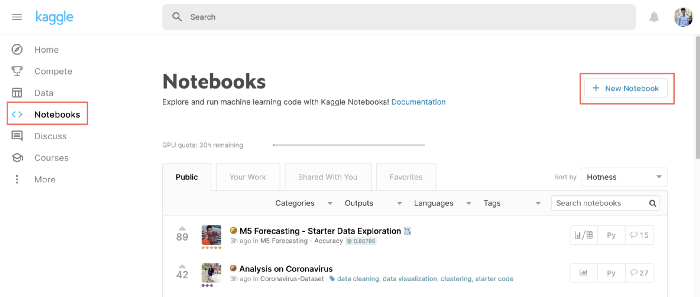
新建一個新的 NoteBook
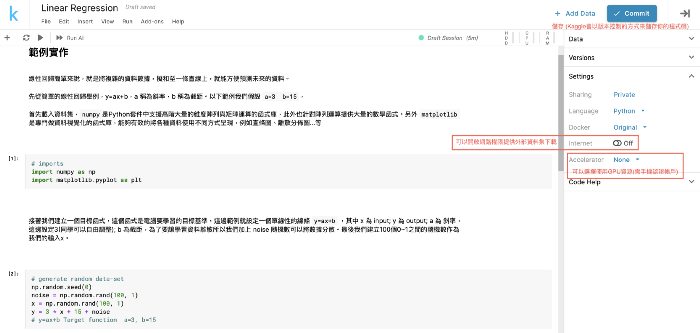
這邊我提供一個簡單線性回歸的範例,各位可以直進入此連結 Copy and Edit 到自己的帳號中。
我們都簡稱 Colab。這個平台是 Google 所維護的服務,他會與你的 Google Drive 連動,這也意味著你得程式碼將會備份在雲端硬碟中。基本上你只要打開雲端硬碟在安裝 Chrome 的相關套件就可以使用了~
這裡我也提供一個範例程式,各位可以跟著下面步驟並Fork到自己的雲端硬碟中。
若是初次使用的讀者,此時若沒看到 Google Colaboratory 的選項表示你的電腦尚未安裝插件。接著點選更多應用程式來下載。
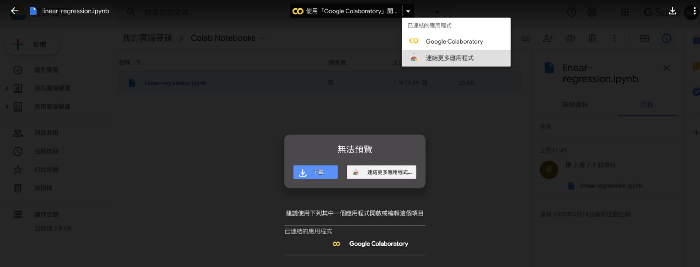
之後會彈出一個視窗,在搜尋欄打上 colab 就會跳出相關插件。點進去後點擊安裝來下載應用(PS.以上步驟需在Google Chrome瀏覽器下完成)。
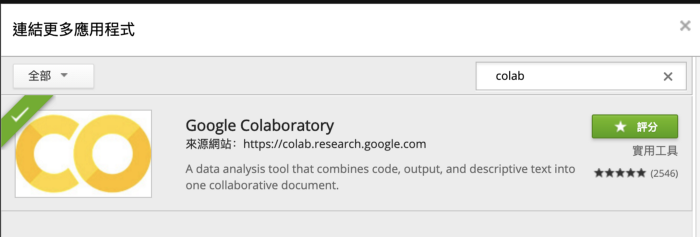
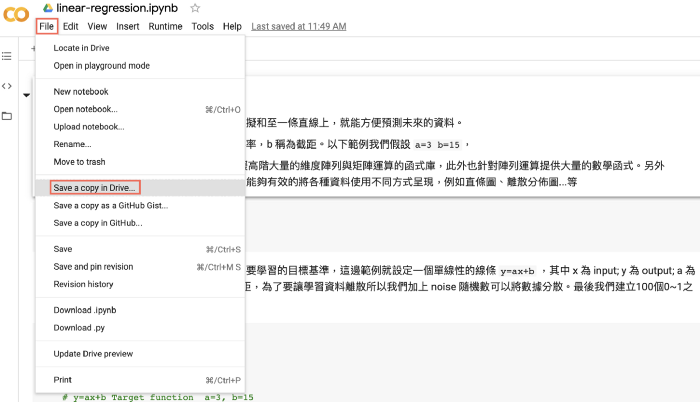
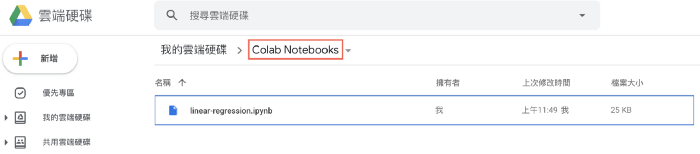
安裝完成後點選使用「Google Colaboratory」開啟。開啟後就會看到一個範例程式,因為這支程式是儲存在我的雲端硬碟中,若你想執行的話點選 File → Save a copy in Drive 將程式複製到你的雲端硬碟中。
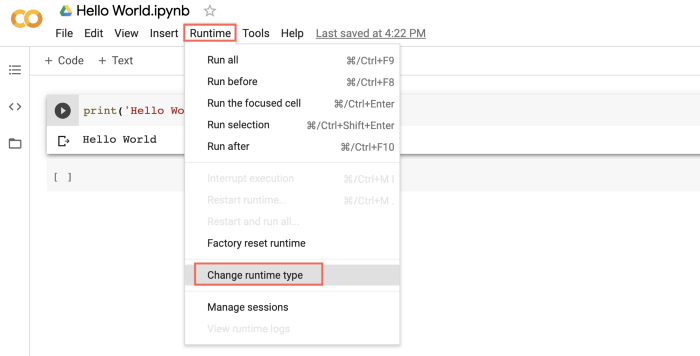
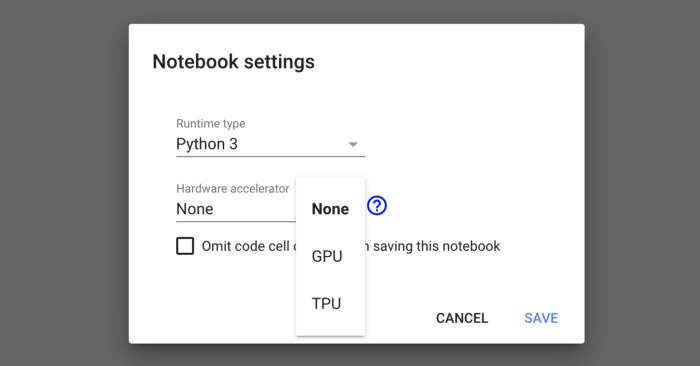
如果你的專案需要使用到GPU的話可以點選 Runtime → Change runtime type。點擊進去設定後即可使用 GPU 或 TPU。
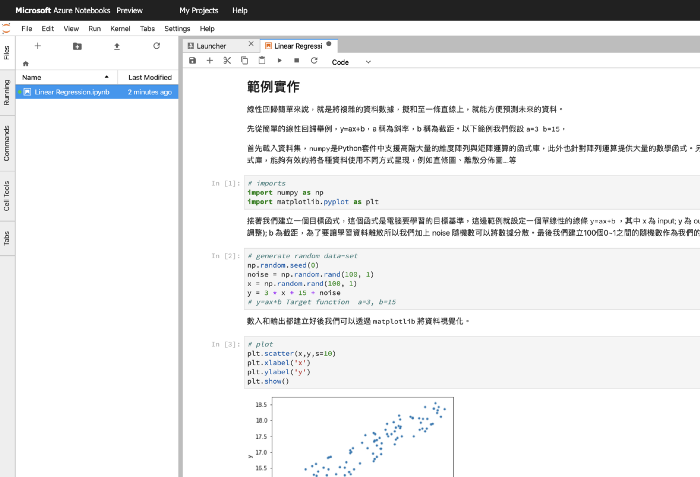
微軟的 Azure Notebooks 目前還處於開發測試階段,或許還不是很穩,但我們還是可以觀望。他的優點是能夠直接跟 GitHub 的專案連動,版本控制對工程師可說是非常重要的一環,大家應該沒忘記微軟早在 2018 年宣布收購 GitHub 的消息吧!
各位可以參考這個範例,打開後應該是 tree 結構的 Notebook,如果想換成下圖的編輯環境,可以在網址後面的 /tree 改成 /lab 就會跟下圖一樣了。由於目前還是測試階段,僅提供各位一個雲端服務的參考。日後發布正式版有多功能會再詳細介紹他。
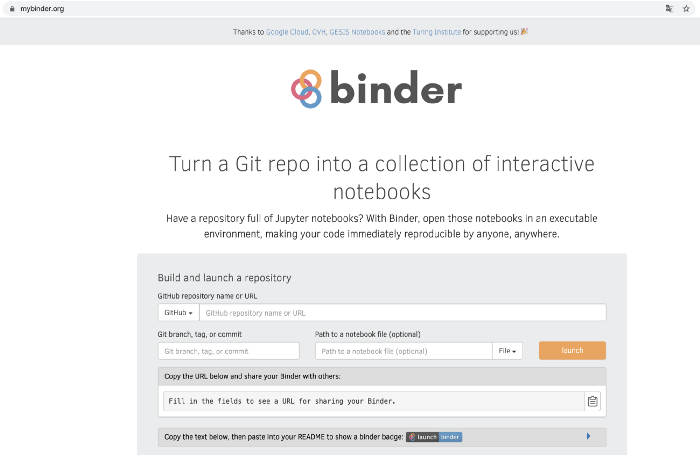
mybinder 跟微軟的 Azure 有點異曲同工之妙。mybinder 主要可以貼上 GitHub 的專案網址,接著透過 Docker 建立一個虛擬映像,幫你在平台上建立一個虛擬環境。因為是免費的服務,所以許多套件要自行安裝,例如sklearn、OpenCV、TensorFlow……等,這個服務比較適合在開發一個新的演算法並放在 GitHub 上,且需要提供一個測試環境給使用者做 live demo。個人不推薦在上面直接開發。
以上四個免費雲平台都可以讓開發者在網路上自由開發,當然免費資源多少有些不便,以及使用上的限制。不過,有效地善用網路資源的確可以減少我們在開發上的負擔!
1.python3爬虫给seleium库所遇到的问题
https://blog.csdn.net/Omann/article/details/105074783
2.selenium.common.exceptions.WebDriverException: Message: Service geckodriver unexpectedly exited. Status code was: -11 - How to fix?
https://stackoverflow.com/questions/53989001/selenium-common-exceptions-webdriverexception-message-service-geckodriver-unex
--
Traceback (most recent call last):
File "C:\Users\UT\AppData\Local\Programs\Python\Python37-32\lib\site-packages\selenium\webdriver\common\service.py", line 76, in start
stdin=PIPE)
File "C:\Users\UT\AppData\Local\Programs\Python\Python37-32\lib\subprocess.py", line 775, in __init__
restore_signals, start_new_session)
File "C:\Users\UT\AppData\Local\Programs\Python\Python37-32\lib\subprocess.py", line 1178, in _execute_child
startupinfo)
FileNotFoundError: [WinError 2] 系統找不到指定的檔案。
During handling of the above exception, another exception occurred:
Traceback (most recent call last):
File "<pyshell#1>", line 1, in <module>
browser = webdriver.Firefox()
File "C:\Users\UT\AppData\Local\Programs\Python\Python37-32\lib\site-packages\selenium\webdriver\firefox\webdriver.py", line 164, in __init__
self.service.start()
File "C:\Users\UT\AppData\Local\Programs\Python\Python37-32\lib\site-packages\selenium\webdriver\common\service.py", line 83, in start
os.path.basename(self.path), self.start_error_message)
selenium.common.exceptions.WebDriverException: Message: 'geckodriver' executable needs to be in PATH.
問題: 料號建立後, UOM是否可修改?
依Oracle文件所列, 12.2.9之前不行, 在12.2.9及之後的版本才有新功能.
變通作法1:
If item is newly created and NOT yet used in any transactions, then you can delete item using delete group functionality (Inventory > Items > Delete Items) and recreate the item.
Navigate to Inventory
Delete Items
Enter a Delete Group
Pick a Delete Group Type
Enter the Description
Enter Items to delete
Click Save
變通作法2:
Inactivate the item with bad UOM in future and create/replace it with new item with required UOM definition.
Navigate to Inventory
Items
Query the Item with the wrong UOM
Change the Item Status to Inactive
Click Save
變通作法3:
If the item has been transacted and has no outstanding orders, purchase orders or WIP jobs you can do the following if approved by your management.
Rename the existing item 'XYZ' to 'XYZ-Wrong UOM' and save the item (Here Naming is just an example, you can use your own nomenclature).
Navigate to Sysadmin
Set the profile INV: Updateable Item name to"Yes"
Navigate to Inventory Responsibility > Items> Master Items
Query the item number which is to be modified
The item name/number can be modified
Reset the value once required changes are done
Ref:
1.How to Update and or Change Item Unit of Measure (UOM) (Doc ID 1360479.1)
2.Item Setup FAQ (Doc ID 111742.1)
3.INVIDITM - How to Rename Inventory Items (Doc ID 255560.1)
